Showing posts with label QoS. Show all posts

Thursday, November 3, 2016

QoS Enhacements in CUCM 11.X

  • These were added in CUCM v11
  • The main enhancements are:
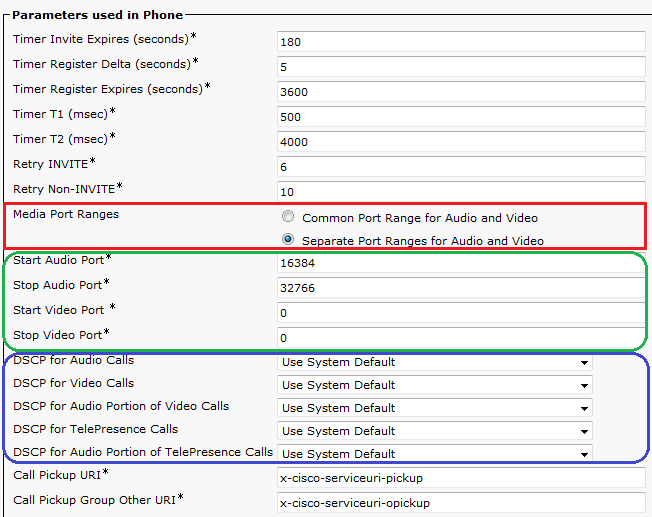
    • Separating UDP Port Ranges for Audio and Video
    • Separating DSCP Markings for Audio and Video streams in Video Calls
      • You can have separate markings for audio in Telepresence video call than Fixed video call
  • Navigate to Device > Device Settings > SIP Profile.
  • Current endpoints which support this enhancement (03/11/2016)
Video Endpoint
DSCP for Audio Portion of Video Calls
DSCP for Audio Portion of TelePresence Calls
8800 Series
Yes
N/A
8900 Series
No
N/A
9900 Series
No
N/A
Jabber
Yes (Jabber for Windows uses Group Policy Objects to mark traffic on the PC else DSCP will be set to '0'. All other Jabber clients are able to mark DSCP natively)
No
DX Series
Yes
Yes
TX Series
N/A
Yes
IX Series
N/A
No
CE 8.x Software Series (SX Series, MX Series G2, MX700, MX800)
N/A
Yes
TC 7.1.4 Software Series (C Series, Profile Series, EX Series, MX Series G1)
N/A
Yes
EX Series (TC Software)
N/A
Yes

  • Restrictions
    • These features are supported on SIP endpoints Only
    • For Jabber Softphones, only separate UDP ports can be used. This is because Windows OS doesn’t allow DSCP markings natively (can be fixed by registry tweak or using GPO)
    • Prior to this feature, Jabber Client will divide the RTP Port Range received in TFTP File into two splits. Lower half will be used for audio and upper half will be used for video

Enable DSCP Markings on Windows OS (7, 8, 10)

By default windows OS will set DSCP markings to '0' ignoring the marking settings on the client. This can be good and bad.

A good scenario is to make sure that torrent clients aren't getting priority (while ideally your enterprise network qos policies should overcome this problem as well)

A bad scenario is overriding DSCP markings from Jabber Client which marks packets genuinely  for seperating audio and video streams treatment.

While you can still overcome the problem of Jabber Client using network QoS policies, you can allow QoS marking on windows OS as follow:

1. Go to HKLM\System\CurrentControlSet\Services\Tcpip\QoS. If "QoS" folder doesn't exist there - create it.
2. Add a DWORD parameter named "Do not use NLA" and assign "1" as its value.
3. Reboot.


Wednesday, April 22, 2015

RSVP Basics


In IP Telephony World, RSVP is a CAC mechanism that can reserve bandwidth for the length of the call. If any router along the path cannot reserve the requested bandwidth, the originating gateway, CUBE, or CallManager can reroute the call, send it with different marking, or drop it.

One drawback to RSVP is that the reservation process causes some delay in call setup. To minimize this, include RSVP control messages LLQ.

RSVP Signaling

Its Network control protocol (protocol number 0x2e and operates at L3) that allows internet applications to reserve QoS resources for their traffic. Note that RSVP will do the signaling for reservation but the actual reservation should be done by queuing mechanisms.

RSVP messages 
1. Path Message
It’s sent by the sender through the path provided by routing protocol towards the receiver. It will store flow info in each node and enables each node to realize the previous and next hop of the session. Those messages are sent periodically. They are used to form RSVP neighbor ship.
2. Reservation Message
Those are sent from receiver to sender and should follow the exact path of Path Message (it will use Path messages to obtain reservation message path). It’s used to maintain reservation state in each router. It is sent periodically.
3. Confirmation and Error Messages
Those are classified as path-error, reservation-error, and reservation-acknowledge messages. Path error messages are generated from path messages and in direction towards sender. At each hop the destination address is the previous hop. Reservation error messages are generated by reservation request and sent towards the receiver. Information carried in error messages can be:

  1. Admission failure
  2. Bandwidth not available
  3. Service not supported

Reservation acknowledgments are generated by sender to confirm the receipt of reservation request.
4. Teardown Message
Those are used to remove RSVP state from each node without waiting for timeout. It can be initiated by host to tear down reservation or router in case reservation timed out. It has two types depending on the initiator (sender/receiver): Path teardown and reservation-request teardown.

RSVP operation
A typical RSVP session involves the following sequence of events:
  1. A potential sender starts sending RSVP Path messages to the session address (destination address).
  2. The receiver receives the Path messages.
  3. The receiver sends appropriate Resv messages toward the sender through the same path of Path messages. These messages will carry FlowSpec, which is used by routers along the path to make reservations in their link-layer media.
  4. The sender receives the Resv message, and then it starts sending application data.
Once those steps are completed successfully, RSVP demon will set arguments in packet classifier (to identify RSVP flows) and packet scheduler (on routers) for the desired flow to be processed using the underlying queuing mechanism.

Note that this sequence of events is not necessarily strictly synchronized. For example, application data can flow before the sender receives Resv messages. Application data that is delivered before the actual reservation contained in the Resv message is typically treated as best effort, nonreal-time traffic with no QoS guarantee.

RSVP reservation Style
Before proceeding with reservation style, four terms should be defined:
  1. Distinct reservation: Each receiver establishes its own reservation with each upstream sender.
  2. Shared reservation: All receivers make a single reservation that is shared among many senders.
  3. Explicit sender: List all selected senders.
  4. Wildcard sender: Select all senders, which then participate in the session.
Reservation style is used by the receiver to define how reservations are accomplished with multiple senders. From the above options, below reservation styles were defined:
  1. Fixed filter (FF): This reservation style consists of distinct reservations among explicit senders. Examples of applications that use fixed-filter style reservations are video applications and unicast applications, which both require flows that have a separate reservation for each sender.
  2. Wildcard filter (WF): This reservation style consists of shared reservations among wildcard senders. This type of reservation reserves bandwidth for any and all senders, and propagates upstream toward all senders, automatically extending to new senders as they appear. A sample application for wildcard filter reservations is an audio application in which each sender transmits a distinct data stream. Typically, only a few senders are transmitting at any one time. Such a flow does not require a separate reservation for each sender; a single reservation is sufficient.
  3. Shared explicit (SE): This reservation style consists of shared reservations among explicit senders. This type of reservation reserves bandwidth for a limited group of senders. A sample application is an audio application similar to that described for wildcard filter reservations.
RSVP Basic Configuration

RTR(config-if)# ip rsvp bandwidth !! Enable RSVP on interface. Without this RSVP messages can’t be received/send. Also, once reservation installed, BW will be subtracted from max-reserved-bandwidth.
RTR(config)# ip rsvp sender session-ip-address source-ip-address protocol des-port-num src-port-num previous-hop-address previous-hop-interface bandwidth burst-size !! Install RSVP sender statically in DB. ip rsvp sender-host command can be used to simulate sender (use proxy feature). Same can be done for receiver.
RTR(config)# ip rsvp neighbor access-list !! To restrict RSVP neighbors
RTR(config)# ip rsvp udp-multicasts des-address !! Instruct the router to send UDP multicasts whenever it generates IP multicasts. This is required sometimes for trigger other hosts.
RTR(config-if)# ip rsvp precedence conform value exceed value !! Set IPP
RTR(config-if)# ip rsvp tos conform value exceed value !! Set ToS
RTR(config-if)# ip rsvp signaling DSCP value !! Set DSCP value for RSVP messages to prioritize them

SENDER-1#sh ip rsvp interface detail fa0/1

 Fa0/1:
   Interface State: Up
   Bandwidth:
     Curr allocated: 32K bits/sec
     Max. allowed (total): 256K bits/sec
     Max. allowed (per flow): 64K bits/sec
     Max. allowed for LSP tunnels using sub-pools: 0 bits/sec
     Set aside by policy (total): 0 bits/sec
   Admission Control:
     Header Compression methods supported:
       rtp (36 bytes-saved), udp (20 bytes-saved)
   Traffic Control:
     RSVP Data Packet Classification is ON via CEF callbacks
   Signalling:
     DSCP value used in RSVP msgs: 0x3F
     Number of refresh intervals to enforce blockade state: 4
     Number of missed refresh messages: 4
     Refresh interval: 30
   Authentication: disabled
!! Define policy to restrict/control RSVP messages
RTR(config)# ip rsvp policy local default|acl …
RTR(config-rsvp-policy-local)#{accept | forward} {all | path | path-error | resv | resv-error}

For better performance, minimize the bandwidth consumed by RSVP messages, and reliable RSVP messaging; RSVP periodic refreshment and reliable messaging feature can be enabled.

Also, RSVP can be made compression aware in order to reserve bandwidth for compressed traffic rather than uncompressed one. RSVP messages authentication is supported and can be implemented on per-neighbor basis.

One more option is to change hop IP address of RSVP messages that will be provided to neighbor in path messages (PSB Path State Block). Usually physical interface address will be provided in path messages.

Tuesday, April 21, 2015

Remarking Calls over Two CoS MPLS WAN

I had a scenario where the client bought two CoS L3 MPLS links for all his offices (HQs & BRs). 20% CoS1 is used for voice calls while 80% CoS3 for data.

As you know, MPLS providers will drop excess packets on CoS1. The excess packets from CoS1 won't be remarked. For other CoSes excess packets are remarked to default CoS.

Initially, we deployed E-LCAC for his network to make sure that once CoS1 is full calls are blocked. The client decided not to go for AAR.

The demand for On-Net calls increased and the users started getting "Not Enough Bandwidth" message very frequent.

Increasing E-LCAC location bandwidth wasn't an option as this will degrade overall calls performance due to packets getting dropped at CoS1 (remember excess packets at CoS1 are dropped).

The client didn't want to invest on upgrading CoS1 and wanted to pass excess calls over CoS3.

Challenges

- Network devices won't be able to do this as they mark packets not calls. This means that packets for a single call can have different marks which is very bad.
- CUCM won't be able to do this as CUCM doesn't set in the call path. It does signaling only.

Solution

The solution was to combine CUCM and Network devices with an RSVP E-LCAC deployment. This will utilize the fact that RSVP CAC will remark the calls to default DSCP in case RSVP reservation fails.

1. CUCM will try to reserve bandwidth using static location 
2. Next CUCM will try to allocate RSVP agents for the call
3. In case RSVP bandwdith is available, reservation is made and the RSVP agent will pass the calls as CoS1 (DSCP=EF)
4. In case RSVP bandwidth isn't available (fully consumed), reservation will failed. CUCM will still allocate RSVP agent without RSVP reservation. The RSVP agent will pass the calls as CoS3 (DSCP=0 by default)

Configuration Steps

I won't be detailing the step by step config as this can be lengthy. However, I will list summary steps and some relevant config.

1. In CUCM create locations for each office and a transit location called MPLS.
2. Connect the offices locations to MPLS location using links.
3. Link bandwidth should equal the total bandwidth of the office (CoS1 + CoS3).
4. In your E-LCAC location configuration, configure RSVP settings to optional (video desired) 
5. Configure software MTP at the gateway of each location. The MTP codec should match your inter-region codec and the maximum number of sessions should accommodate for the entire office bandwidth (CoS1 + CoS3)

e.g. if you are using G729 and your office bandwidth is 2 Mbps, then the max number of sessions should be > 86.

dspfarm profile 3 mtp 
 description **** RSVP CAC MTP ***
 codec g729r8
 rsvp
 maximum sessions software 100
 associate application SCCP

6. Create MRGs per office with the software MTPs associated and MRGLs per office. Assign the MRGLs to offices SIP/H323 Trunks/Gateways

7. Configure RSVP on the office routers. The amount of RSVP bandwidth should equal CoS1 and the max per-RSVP session bandwidth should be for 1 call + buffer (for G729 the max per-RSVP session bandwidth should be 40kbps).

 interface GigabitEthernet0/1
  ip rsvp bandwidth 400 40
  ip rsvp data-packet classification none

8. You can change the default DSCP marking for failed RSVP reservations from service parameters
 
Note: By default, RSVP attempts to process every packet not just provide CAC. Turn this off with the ip rsvp data-packet classification none interface command.

Tuesday, April 7, 2015

Gateway-Controlled RSVP CAC (CME or CUBE - no CUCM)


You must configure RSVP on each router that will create reservation using ip rsvp bandwidth [total-kbps] [single-flow-kbps] command. If you do not specify the total bandwidth to reserve, the router reserves 75 percent of the interface bandwidth. If no flow value is specified, any flow can reserve the entire bandwidth.

Synchronization between RSVP and call setup is enabled by default. If it has been disabled, the command to enable it is call rsvp-sync.
To set the DSCP value for RSVP control messages, use the ip rsvp signaling dscp {dscp-value} interface command.
To enable RSVP reservation on dial-peers of originating and terminating gateways, use the commands req-qos & acc-qos. The command req-qos defines the requested QoS level in RESV Request message while the command acc-qos defines the minimum acceptable QoS level in the RESV Response message. The combination of the commands at both gateways defines how the call is treated. This is summarized below in the table.
Call Scenarios
Originating Gateway

Terminating Gateway


Requested QoS
Acceptable QoS
Requested QoS
Acceptable QoS
Results
1
controlled-load or guaranteed-delay
Call proceeds only if both RSVP reservations succeed.
2
controlled-load or guaranteed-delay
best-effort
Call proceeds only if both RSVP reservations succeed.
3
controlled-load or guaranteed-delay
best-effort
best-effort
Call is released.
4
controlled-load or guaranteed-delay
best-effort
controlled-load or guaranteed-delay
Call proceeds only if both RSVP reservations succeed.
5
controlled-load or guaranteed-delay
best-effort
controlled-load or guaranteed-delay
best-effort
Call proceeds regardless of RSVP results. If RSVP reservation fails, call receives best-effort service.
6
controlled-load or guaranteed-delay
best-effort
best-effort
best-effort
Call proceeds with best-effort service.
7
best-effort
best-effort
controlled-load or guaranteed-delay
Call is released.
8
best-effort
best-effort
controlled-load or guaranteed-delay
best-effort
Call proceeds with best-effort service.
9
best-effort
best-effort
best-effort
best-effort
Call proceeds with best-effort service.

There is no clear guidelines in IETF docs for the use of controlled-load versus guaranteed-delay. However, in summary, guaranteed-delay should be used for voip application.
  • The Guaranteed service does not control the minimum or average delay of datagrams, merely the maximal queuing delay. The service guarantees that datagrams will arrive within the requested delivery time and will not be discarded due to queue overflows, provided the flow's traffic stays within its specified traffic parameters.
  • Controlled load Service approximates the end-to-end behavior provided to best effort service under unloaded conditions. The assumption here is that under unloaded conditions, a very high percentage of the transmitted packets are successfully delivered to the end-nodes, and the transmission delay experienced by a very high percentage of the delivered packets will not vary much from the minimum transit delay

!!...Configure RSVP on the outgoing interface
Shanghai-GW(config)#int s2/0
Shanghai-GW(config-if)#bandwidth 1544
Shanghai-GW(config-if)#ip rsvp bandwidth 400 40
Shanghai-GW(config-if)#ip rsvp signalling dscp 31

!!...Configure QoS on the outgoing dial peer
Shanghai-GW(config-if)#dial-peer voice 3400 voip
Shanghai-GW(config-dial-peer)#req-qos guaranteed-delay
Shanghai-GW(config-dial-peer)#acc-qos guaranteed-delay


  1. FIFO SHOULDN’T be used as queueing mechanism (usually WFQ) when enabling RSVP. This should be noted while having Ethernet interfaces for WAN since default is FIFO. For serial interfaces default is WFQ.
  2. In case sub-interfaces are used, WFQ and RSVP should be enabled on parent interface, and RSVP should be enabled on sub-interface (once its enabled on sub it will reflect automatically on parent).
  3. In case Loopback interface is used as signaling source (in this diagram H323), still RSVP should be applied in sub interface and NOT Loopback interface.

BR1#sh ip rsvp interface       
interface    rsvp  allocated  i/f max  flow max sub max
Fa0/0        ena   80K        75M      75M      0  
Fa0/0.1      ena   80K        1M       100K     0  
Lo0          ena   0          1M       100K     0  

DNS Performance Troubleshooting

When you are troubleshooting internet performance, there are different parts of the connection should be verified:   ·         DNS Pe...